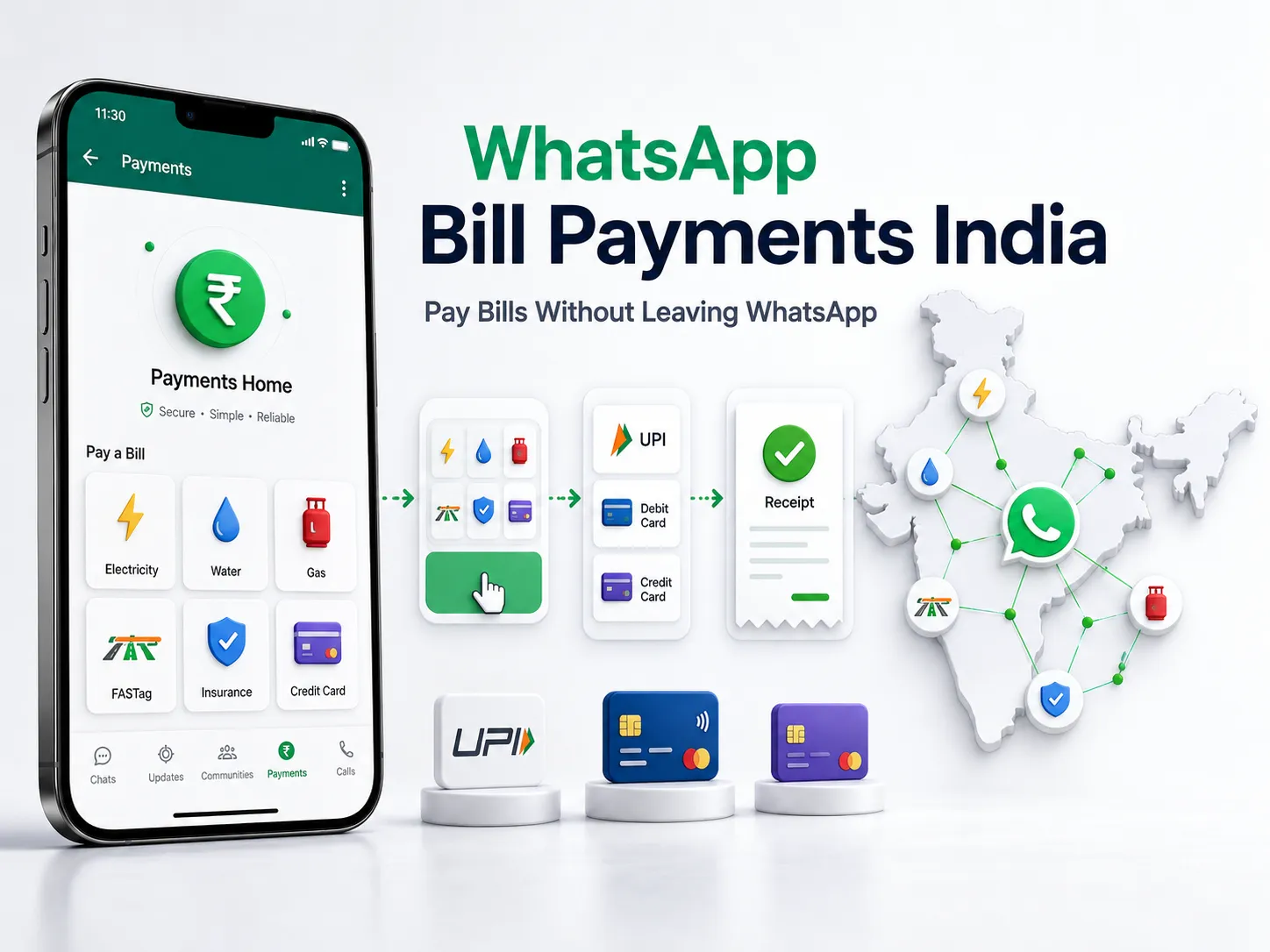
WhatsApp users in India can now find, manage and pay eligible household and utility bills without leaving the app.
Meta officially announced WhatsApp Bill Payments on 3 September 2026. The feature is powered by the Bharat Connect network, formerly known as the Bharat Bill Payment System or BBPS. It currently provides access to 22,722 billers across 30 categories. Meta’s official India announcement
Supported categories include electricity, water, gas, FASTag, insurance, credit-card payments and loan repayments. Users can pay through UPI, debit cards or credit cards, depending on the available options for the bill and account.
The feature is being introduced gradually across India. Meta says it will reach Android and iOS users over the coming weeks, so the option may not appear on every phone immediately.
Key takeaways
- WhatsApp Bill Payments was announced in India on 3 September 2026.
- The service runs through the Bharat Connect or BBPS network.
- Meta says 22,722 billers across 30 categories are available.
- Users can pay eligible bills through UPI, debit cards or credit cards.
- The Payments interface can show previous payments and upcoming bills.
- Multiple accounts under the same provider can be managed together.
- The rollout is gradual across Android and iOS.
- WhatsApp has not announced a fixed date by which every account will receive the feature.
- Applicable fees, if any, must be shown before payment and on the receipt.
- This consumer feature is different from WhatsApp Business API messaging and automation.
What is WhatsApp Bill Payments?
WhatsApp Bill Payments is an interface inside WhatsApp Pay that lets users fetch and pay eligible bills listed through Bharat Connect.
The service covers recurring and non-recurring bills, subject to the biller and category being available. It is designed to bring bill discovery, payment and basic management into one place.
The launch goes beyond sending money to another WhatsApp contact. Users can select a registered biller, enter their account details, fetch the current amount and complete the payment inside WhatsApp.
According to Meta, bills that were previously paid through the feature can appear on Payments Home for easier access. Users can also review past payments, see upcoming bills and manage more than one account with the same provider. Meta’s Bill Payments announcement
What is Bharat Connect?
Bharat Connect is the consumer-facing identity associated with the Bharat Bill Payment System.
BBPS is an integrated bill-payment platform operated by NPCI Bharat BillPay Limited, a wholly owned subsidiary of the National Payments Corporation of India.
WhatsApp’s India Payments Terms describe WhatsApp India as an Agent Institution connected through authorised Customer Operating Units under the BBPS framework. The network helps participating customer interfaces fetch bills and route eligible payments to registered billers. WhatsApp India Payments Terms
WhatsApp did not create Bharat Connect, and Meta does not own NPCI. WhatsApp is providing another interface through which eligible Bharat Connect bills can be accessed and paid.
Which bills can be paid through WhatsApp?
Meta says the launch covers 30 Bharat Connect categories. Examples named in the announcement include:
- Electricity bills
- Water bills
- Gas bills
- FASTag payments
- Insurance payments
- Credit-card bills
- Loan repayments
These are examples, not the complete list.
A category being supported does not mean every provider in that category is available. Users must search for their specific biller inside the feature.
It should also not be assumed that every biller accepts every payment method. The options presented during checkout will depend on the bill, provider and available payment setup.
How to pay a bill through WhatsApp
Meta provides the following process.
1. Open WhatsApp
Open the WhatsApp app and look for the ₹ icon at the top of the home screen.
2. Choose a bill category
Select the required category, such as electricity, water, FASTag or insurance.
3. Select the biller
Find the company or provider that issued the bill.
4. Enter the account details
Add the information requested by the biller. This may include a consumer number, customer ID, registered phone number or another account reference.
5. Check the fetched bill
Review the amount and other details shown before continuing.
6. Select a payment method
Choose from the payment methods available for that bill. Meta currently lists:
- UPI
- Debit card
- Credit card
7. Confirm the payment
Complete the required authentication through the secure payment process.
The same six-step flow was also reported by The Indian Express following Meta’s announcement.
What should you check before paying?
Do not confirm a payment only because a bill amount appears on the screen.
Use the following check:
Find
Confirm that you selected the correct:
- Bill category
- Provider
- Account type
Verify
Check the following information where it is displayed:
- Biller name
- Consumer or customer number
- Account holder’s name
- Billing period
- Amount due
- Due date
- Outstanding or late-payment amount
WhatsApp’s India Payments Terms place responsibility on the user to provide accurate information and verify the fetched bill. If the details are wrong, contact the biller before paying. WhatsApp India Payments Terms
Pay
Choose the required payment option and complete authentication through the payment screen.
Never send your UPI PIN, OTP, debit-card PIN or credit-card PIN as an ordinary WhatsApp message. A genuine support representative should not ask you to reveal these details in a chat.
Save
After payment:
- Check the payment status
- Retain the receipt
- Review the transaction in payment history
- Confirm that the biller has updated the account
- Raise a complaint if the payment has failed, reversed or remains unresolved
WhatsApp’s terms say users can view bill-payment receipts and transaction history through the Bill Payments interface. Payment-processing complaints can be started through the customer-grievance section in the app.
Can you manage bills for your home, office and family?
Yes, where the required biller and accounts are supported.
Meta says users can manage multiple accounts under one provider. For example, one electricity provider may have separate accounts for:
- Your home
- Your office
- A parent’s home
- Another property
This can reduce the need to search for the same provider every month. Frequently used categories and previously paid billers may also appear on Payments Home.
If you pay a bill for another person, WhatsApp’s terms say you are responsible for obtaining that person’s consent and the permissions needed to use their information. WhatsApp India Payments Terms
Can you see payment history and upcoming bills?
Meta says the Bill Payments interface can show:
- Previous payments
- Upcoming bills
- Bill summaries
- Multiple accounts with the same provider
- Previously used billers
- Frequently used categories
A biller previously paid through the feature may appear on Payments Home for quicker access.
This is designed for easier repeat payments, but Meta has not confirmed automatic recurring payments as part of the launch. Users should not assume a bill will be paid automatically unless the live interface clearly provides and confirms such an option.
Why is the WhatsApp Bill Payments option not showing?
The most likely reason is the gradual rollout.
Meta says the feature is being released across India over the coming weeks. It has not provided separate availability dates for Maharashtra, Mumbai, Mira Road, Bhayandar, Thane or any other location.
If the ₹ icon or Bill Payments option is missing:
- Update WhatsApp through the Google Play Store or Apple App Store.
- Reopen the app and check the top of the home screen.
- Review the Payments section if it is available on your account.
- Confirm that you are using an Indian phone number.
- Wait for the rollout if the feature is still unavailable.
Do not download an unofficial APK or share account details with anyone claiming they can activate the feature manually.
The official rollout covers Android and iOS, but Meta has not published a fixed date for complete availability. Meta’s rollout information
Who is eligible to use WhatsApp Bill Payments?
WhatsApp’s India Payments Terms state that a person must be at least 18 years old to use WhatsApp Pay.
Bill Payments requires a phone number with India’s country code. The exact information needed can vary by bill category and provider.
For UPI payments, the general WhatsApp Pay requirements may include an eligible Indian bank account, a matching registered phone number and a UPI PIN. Card payments will follow the authentication and eligibility requirements shown during the payment process. WhatsApp India Payments Terms
Are WhatsApp bill payments free?
Do not assume that every bill payment is free.
WhatsApp’s India Payments Terms say applicable fees or charges may include customer convenience fees and internet-handling charges. Any charge connected with the bill payment should be shown before the payment is completed and recorded on the receipt. WhatsApp India Payments Terms
The final amount can depend on:
- The biller
- The payment method
- The payment partner
- Applicable convenience charges
- The user’s bank or card terms
Check the complete payable amount before confirming.
What information does WhatsApp collect for bill payments?
The information required depends on the selected category and biller.
WhatsApp’s India Payments Privacy Policy says Bill Payments may require details such as:
- Name
- Phone number
- Email address
- Date of birth
- Government ID number, where required for the category
- Bill category
- Biller information
- Reference transaction number
- Bill amount
- Due date
- Device or account identifiers used for payment processing and security
WhatsApp India may share required Bill Payments information with the relevant Customer Operating Unit and payment aggregator so the bill can be fetched and paid.
The policy also says users can remove a registered biller from Bill Payments settings to stop future bill fetches and reminders for that biller. WhatsApp India Payments Privacy Policy
What happens if the bill or payment is wrong?
If the fetched bill is incorrect
Do not pay it until you verify the details with the biller.
Check the account number, billing period, due date and amount. WhatsApp’s terms direct users to contact the biller when the fetched information contains a discrepancy.
If the payment fails
Review the transaction status and avoid immediately paying again without checking whether the first attempt was processed.
Use the customer-grievance section inside the Bill Payments interface for a payment-processing complaint.
If WhatsApp shows success but the biller has not updated the account
Keep the receipt and transaction reference. Contact the biller and use WhatsApp’s dispute process where applicable.
WhatsApp’s terms explain that the company does not operate the BBPS network itself and does not control the delivery of the underlying service purchased from the biller. They also state that users remain responsible for late fees charged by billers. WhatsApp India Payments Terms
WhatsApp Bill Payments versus normal UPI transfers
| Service | Main purpose | Part of this launch? |
|---|---|---|
| Person-to-person WhatsApp UPI payment | Send money to another eligible person or recipient | No |
| Mobile recharge | Recharge a supported mobile number | No |
| WhatsApp Bill Payments | Find, fetch, manage and pay eligible Bharat Connect bills | Yes |
| Payment link received in WhatsApp | Open an external or connected checkout page | No |
| WhatsApp Business API message | Send business notifications, support messages or automated replies | No |
| Business invoice collection | Collect a company’s own customer invoice | Not automatically included |
A UPI transfer generally starts with the recipient or payment address. Bill Payments starts with a supported category and registered biller, then fetches the amount connected to the customer’s account.
Is Bill Payments part of the WhatsApp Business API?
The launch announcement describes a consumer feature inside WhatsApp Pay. It does not announce automatic Bill Payments access for WhatsApp Business API accounts.
The announcement does not confirm that:
- Every WhatsApp Business account can become a biller
- Every company can collect its own invoices through Bill Payments
- API users receive payment tracking automatically
- Meta has opened a general merchant-registration process
- Businesses can join Bharat Connect without the required eligibility or approval
- Chatbots can trigger or approve payments without an authorised payment flow
A business may already use WhatsApp Business API for reminders, customer support and status updates. That messaging system is separate from the payment network used to fetch and settle eligible bills.
What the launch means for Indian businesses
The feature gives businesses one clear lesson: more customer tasks are moving into WhatsApp.
A customer journey may now involve three separate parts:
1. Reminder
The customer receives an approved notification about a due date, account update or payment requirement.
2. Support
A staff member or chatbot helps the customer understand the bill, find the account number or raise a complaint.
3. Payment
The transaction is completed through an authorised payment interface.
These parts should not be mixed carelessly. A chatbot can explain where to find a bill, but it should not ask the customer to send a PIN or OTP. A reminder can direct someone to an approved payment process, but it does not make the business a Bharat Connect biller.
A structured WhatsApp Business API setup and automation can help a business organise reminders and customer support, but it does not guarantee access to WhatsApp’s consumer Bill Payments feature.
Practical business examples
Real-estate business
A housing society, broker or property-management team may use WhatsApp to answer maintenance or payment questions.
The new launch does not automatically allow a broker to collect booking amounts or property payments through the Bill Payments interface. The business must continue using appropriate approved payment and documentation processes.
Clinic
A clinic may use WhatsApp to send appointment or payment reminders. That does not mean its invoices are automatically available as Bharat Connect bills.
The business should separate patient support, billing notifications and the authorised payment page.
Education business
A coaching institute may send fee reminders and help students understand instalment dates. It should not claim that course fees can be paid through WhatsApp Bill Payments unless the institute is available as an eligible biller through the live interface.
Utility or financial-service business
Eligible billers may gain another customer interface through the Bharat Connect network. The launch announcement does not provide a general onboarding method, so interested organisations should follow the applicable Bharat Connect and regulatory process.
Local service business
A salon, restaurant or repair company cannot assume that the feature allows it to collect every customer invoice. It may still use a payment link or another authorised collection method where permitted.
A practical WhatsApp customer-journey check
Businesses using WhatsApp for payment-related communication should review the following.
Message purpose
Identify whether each message is:
- A reminder
- A support response
- A promotional message
- A payment-status update
- A payment link
Customer clarity
The message should clearly state:
- Who is sending it
- Which account or service it concerns
- The amount, where appropriate
- The due date
- The authorised payment path
- How to contact support
Security
Never ask customers to share:
- UPI PIN
- OTP
- Debit-card PIN
- Credit-card PIN
- Full banking password
Human support
Provide a clear route to a staff member when the fetched bill, payment status or customer account requires investigation.
Records
Keep suitable records of:
- Reminder delivery
- Customer response
- Payment-status update
- Support complaint
- Resolution
- Opt-out request
Vertex Social’s work on organised WhatsApp enquiry management shows how shared access and assigned follow-ups can make customer communication easier to track. It should not be treated as evidence of Bharat Connect bill collection.
What users and businesses should avoid
Do not download an unofficial app
Use WhatsApp from the official Google Play Store or Apple App Store.
Do not share payment credentials in chat
A UPI PIN, OTP or card PIN should only be entered through the correct secure authentication screen.
Do not pay without checking the bill
Confirm the provider, account, billing period, amount and due date.
Do not assume every payment is free
Review any displayed convenience or handling charge before confirming.
Do not pay twice after an unclear status
Check transaction history, retain the reference number and raise a complaint where needed.
Do not assume every user already has access
The rollout is gradual.
Do not assume every business can collect bills
The consumer feature does not create automatic merchant or biller eligibility.
Do not confuse the feature with WhatsApp Business API
Business messaging, payment reminders and Bharat Connect bill settlement are separate functions.
Do not promise automatic recurring payment
Meta’s launch announcement does not confirm recurring autopay.
What remains uncertain?
As of 4 September 2026, Meta has not published:
- A fixed nationwide rollout-completion date
- State or city launch dates
- The percentage of Indian accounts with access
- City-level biller counts
- Adoption or transaction-volume figures
- A universal fee structure covering every biller and method
- Confirmation that every biller accepts all three listed payment methods
- A general business-onboarding process
- Automatic WhatsApp Business API integration
- Support for every type of business invoice
- Confirmed recurring autopay
- Availability under the same terms outside India
Users should check the live interface for their biller, payment methods, final amount and fees.
Frequently asked questions
When did WhatsApp launch Bill Payments in India?
Meta announced the feature on 3 September 2026.
Is it available to every user?
Not yet. It is rolling out gradually to Android and iOS users across India over the coming weeks.
Where can I find Bill Payments?
Meta says users can tap the ₹ icon at the top of the WhatsApp home screen.
Which bills are supported?
The 30 categories include electricity, water, gas, FASTag, insurance, credit-card payments and loan repayments. The exact biller must be checked in the app.
Which payment methods can I use?
Meta lists UPI, debit cards and credit cards. Available methods may differ by biller and account.
Can I pay a family member’s bill?
The feature supports multiple accounts under one provider. WhatsApp’s terms say you must have the other person’s consent and permission to use their information.
Can I see previous payments?
Yes. Meta says users can view previous payments, upcoming bills and previously used billers through the Payments interface.
Why is the ₹ icon missing?
The feature may not have reached your account yet. Update WhatsApp through the official app store and wait for the gradual rollout.
Does WhatsApp charge a fee?
The India Payments Terms allow applicable convenience and handling charges. Any applicable charge should be displayed before payment and included on the receipt.
Is this part of WhatsApp Business API?
No automatic API integration was announced. Bill Payments is a consumer WhatsApp Pay feature connected to Bharat Connect.
Can any business register as a biller?
Meta has not announced a general merchant-onboarding process. Businesses should not assume they are eligible without the required Bharat Connect and regulatory approval.
Building a clearer WhatsApp customer journey
WhatsApp Bill Payments gives Indian users another way to manage routine payments, but access will vary while the rollout continues.
Users should check every bill before paying and retain the transaction receipt. Businesses should keep payment reminders, customer support and authorised payment collection clearly separated.
Companies already using WhatsApp for enquiries, reminders or support can review whether their messaging flow gives customers accurate information, protects payment details and provides a clear route to a person when something goes wrong.