
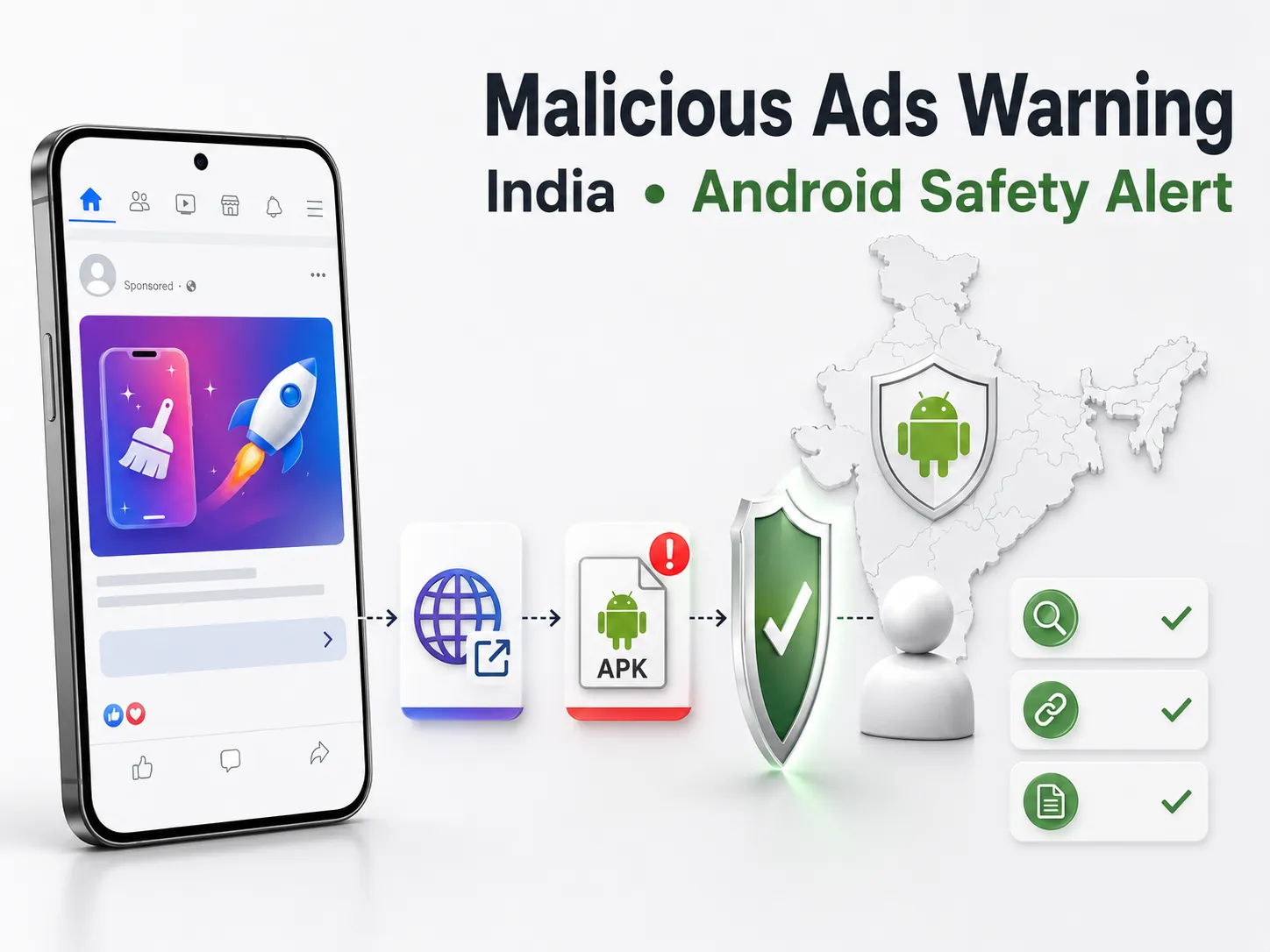
Indian cybercrime authorities have warned that deceptive Facebook and Instagram advertisements were directing Android users to websites offering malicious APK downloads.
The applications were presented as adult-content apps but could request powerful device permissions, expose sensitive information and facilitate financial fraud. The warning came from the National Cybercrime Threat Analytics Unit under the Indian Cyber Crime Coordination Centre, commonly known as I4C.
Reuters subsequently found at least 39 related advertisements still active after the advisory. The publication reported that Meta removed the advertisements Reuters identified after receiving their links. This removal was not announced publicly by Meta, and it does not confirm that every related advertisement, application or campaign has been eliminated.
For Indian users, the immediate concern is phone and banking security. For legitimate advertisers, the incident is also a reminder that customer trust depends on the complete journey from an advertisement to its destination—not merely the presence of a “Sponsored” label.
Key takeaways
- India’s NCTAU advisory was issued on 26 August 2026.
- The warning concerns malicious Android APKs promoted through Facebook and Instagram advertisements.
- Named apps included Night Play, Reloop, Kyss, Vimo, Rivo, Nexo and Vixa, along with possible renamed variants.
- The apps could misuse Accessibility, VPN and other powerful permissions.
- Reuters found at least 39 related active advertisements and reported that Meta removed the ads it flagged.
- Meta did not publicly announce the removal or answer Reuters’ questions.
- There are no confirmed figures for total infections, financial losses or affected users.
- Viewing an advertisement alone does not mean a phone has been infected; the reported attack required users to follow the link and install an APK.
- Anyone noticing unauthorised financial activity should contact their bank and report the incident through 1930 or India’s cybercrime portal.
- Legitimate advertisers should audit their campaign destinations, secure their accounts and monitor brand impersonation.
What did India’s cybercrime authorities warn about?
The I4C/NCTAU advisory describes malicious Android applications disguised as adult-content apps and promoted through deceptive advertisements on Facebook and Instagram.
The identified names included:
- Night Play
- Reloop
- Kyss
- Vimo
- Rivo
- Nexo
- Vixa
- Similar or renamed variants
Finding an app with a similar name does not, by itself, prove that it is the same malicious file. Users should consider where the app came from, whether it was installed as an external APK and what permissions it requested.
The reported journey generally followed this pattern:
- A user saw an advertisement on Facebook or Instagram.
- The advertisement opened an external website.
- The website encouraged the user to download an Android APK.
- The installed app requested powerful permissions, including Accessibility access.
- Some variants could install another app disguised as an update.
- The malware could continue running in the background or make removal difficult.
- Certain variants could install a VPN and route traffic through attacker-controlled systems.
- Exposed information could be misused for unauthorised banking or UPI transactions.
These are possible capabilities, not proof that every installation resulted in stolen credentials or money.
What did Reuters establish about Meta’s removal?
Reuters reported on 31 August 2026 that it found at least 39 related advertisements active after the Indian government advisory.
According to Reuters:
- The advertisements used sexually explicit material to attract clicks.
- One observed advertisement led to a download named Movexa.apk.
- Reuters sent the advertisement links to Meta while requesting comment.
- Meta subsequently removed all the advertisements Reuters had identified.
- Meta did not answer Reuters’ questions.
The figure of 39 should not be treated as the campaign’s total size. It represents the advertisements Reuters independently located—not every advertisement that may have existed.
Meta has also not publicly confirmed whether associated advertiser accounts, domains or other campaign infrastructure were disabled.
What remains uncertain?
As of 2 September 2026, there are no publicly confirmed figures for:
- The total number of malicious advertisements
- How many users clicked the advertisements
- How many people installed the applications
- The number of affected bank or UPI accounts
- The total financial loss connected specifically to this campaign
- The states or cities most affected
- The identities of the campaign operators
- Whether every named app contained identical malware
- Whether all associated websites and domains are offline
- Whether renamed variants or new advertisements remain active
- Whether Meta conducted a broader account-level takedown
- Whether the responsible operators have been identified or arrested
The warning concerns an Android APK-based attack. It does not establish that iPhone users were targeted through the same installation method.
How can an APK advertised on social media become dangerous?
What is an APK file?
An APK is an application installation file used on Android devices. APK files are not automatically malicious, but installing one from an unknown website bypasses some of the protections and review processes associated with an official app store.
A social-media advertisement can lead to any external website chosen by the advertiser. The fact that an advertisement appears inside a familiar platform does not make every external download trustworthy.
Why does Accessibility permission matter?
Android Accessibility features serve legitimate purposes, including helping people interact with their devices. The permission itself is not malicious.
However, a harmful app may misuse Accessibility access to observe screen activity, interact with other apps, press buttons, read displayed information or interfere with removal attempts.
An entertainment app, wallpaper app or adult-content app requesting extensive Accessibility control without a clear functional reason should be treated cautiously.
Why is VPN access a warning sign?
A legitimate VPN routes internet traffic to provide privacy, security or access-related functions. A malicious app may use similar capabilities to redirect or observe traffic through systems controlled by an attacker.
Users should investigate any unknown application that creates a VPN profile or requests VPN access unexpectedly.
The five-stage trust check for social-media advertisements
Vertex Social recommends checking the complete advertisement-to-transaction journey, rather than judging safety from the creative alone.
| Stage | What to check | Warning signs |
|---|---|---|
| Advertisement | Advertiser identity, wording and offer | Unknown page, misleading claims, urgency or explicit clickbait |
| Destination | Domain name, HTTPS and business identity | Misspelt domain, unrelated website or immediate download prompt |
| Download | Where the application is being installed from | Direct APK from an unknown website |
| Permissions | Whether access matches the app’s purpose | Unexplained Accessibility, VPN or device-administrator requests |
| Transactions | Bank, card and UPI activity after installation | Unknown payments, OTP activity or account alerts |
A “Sponsored” label only shows that content was distributed as paid advertising. It should not replace checking the advertiser, destination and download source.
What should Android users do immediately?
If you saw the advertisement but installed nothing
Simply viewing an advertisement does not match the full infection route described in the advisory.
If you did not download or install anything:
- Close the website.
- Do not return to the download page.
- Report the advertisement through the platform.
- Avoid sharing the live link with friends as a warning.
- If possible, retain the advertiser name or a screenshot for reporting.
If you downloaded an APK but did not install it
Delete the APK from the device’s Downloads or Files section and empty it from any relevant recycle or trash folder.
Do not open the file to check what it contains. Review the browser’s download permissions and avoid allowing unknown websites to install applications.
If you installed one of the apps or another suspicious APK
Take the following steps carefully:
- Stop entering passwords, PINs or payment information on the affected phone.
- Review recently installed applications for unfamiliar names.
- Check which apps have Accessibility, device-administrator or VPN access.
- Disable unexplained permissions before attempting to remove the suspicious app.
- Uninstall unfamiliar apps connected with the advertisement.
- Keep Google Play Protect enabled and run a device scan.
- Install available Android and security updates.
- Review banking, card and UPI transactions from a separate trusted device.
- Contact your bank immediately if you notice suspicious activity.
- Change important banking, email and social-account credentials from a trusted device.
Settings and permission names differ between Android brands and versions. If an application cannot be removed, reappears, blocks settings or the phone continues behaving unusually, seek help from a qualified technician or authorised service centre.
Deleting one visible application does not guarantee that every malicious component has been removed. A factory reset may sometimes be considered after expert assessment and safe backup, but it should not be presented as necessary in every case.
How to report financial cyber fraud in India
If money has been transferred without authorisation or banking credentials may have been exposed:
- Contact the bank, card issuer or payment service immediately.
- Ask about blocking the affected payment method or securing the account.
- Call India’s cybercrime helpline at 1930.
- Submit the complaint through the National Cyber Crime Reporting Portal.
- Preserve transaction IDs, screenshots, phone numbers, advertiser names, URLs and timestamps.
- Avoid deleting evidence before recording the relevant details.
The official portal identifies 1930 as India’s helpline for reporting cybercrime, including financial cyber fraud. Reporting quickly may assist the response, but it does not guarantee that lost funds will be recovered.
Why legitimate Indian advertisers should pay attention
This incident does not mean that every Facebook or Instagram advertisement is unsafe. Millions of legitimate businesses use these platforms to reach customers.
However, scam advertisements can make users more cautious about unfamiliar brands, external websites and app downloads. Responsible businesses therefore need to establish trust beyond obtaining ad approval.
Meta’s published advertising rules prohibit fraudulent, deceptive and harmful practices. The appearance of the reported advertisements despite those rules shows why businesses and users still need to inspect the complete journey. Meta’s fraud, scams and deceptive-practices policy
Audit every campaign destination
Check that each live advertisement opens the intended page and uses the correct business domain.
Watch for:
- Old or broken destination links
- Unexpected redirects
- Misspelt domains
- Compromised landing pages
- Download buttons added without authorisation
- Advertisements created by unknown account users
A campaign should be reviewed after launch as well as before approval.
Secure advertising and business accounts
Businesses should:
- Limit administrative access to people who genuinely need it
- Use strong, unique passwords
- Enable available multi-factor authentication
- Remove former employees and unknown partners
- Review recent account and campaign activity
- Protect the email accounts connected to advertising access
- Verify that payment methods and business details have not changed
Account security is particularly important because a compromised legitimate account may appear more convincing to customers.
Make the landing page clearly identifiable
A trustworthy destination should make it easy to verify:
- The business name
- The correct domain
- Contact information
- The purpose of the page
- What will happen after a form submission
- Where an application will be downloaded
- Relevant privacy or data-use information
These elements do not guarantee safety, but their absence should make users more cautious.
Prefer transparent app-download journeys
If a business advertises an Android application, the advertisement and landing page should clearly identify the developer, explain the app’s purpose and direct users to a recognised store wherever applicable.
Any permission request should have a clear functional reason. An app should not request Accessibility, VPN, device-administrator or financial information unrelated to its stated purpose.
Monitor impersonation
Scammers may copy a business’s logo, creative, website layout or offer to make a fraudulent advertisement appear genuine.
Businesses should periodically check for:
- Advertisements using their name without permission
- Fake Facebook or Instagram pages
- Misspelt versions of their domain
- Customer complaints about unfamiliar offers
- Fake applications using their brand identity
- Messages asking users to install external files
When reporting an impersonating advertisement, retain screenshots, account names, destination URLs and the date and time observed.
What advertisers should avoid doing
Do not imply that ad approval is a security certificate
Platform approval does not provide a blanket guarantee for every external website, download or future change to a destination page.
Do not use deceptive urgency
Messages such as “install immediately,” “account will be blocked” or “limited access unless you download now” can resemble common fraud patterns and weaken trust.
Do not hide the final destination
Customers should understand whether a click will open a website, form, app-store listing or downloadable file.
Do not dismiss customer reports
A customer reporting a fake advertisement may be revealing brand impersonation, an account compromise or a misleading affiliate campaign. Preserve the evidence and investigate promptly.
Do not claim the campaign has ended completely
Reuters confirmed the removal of the advertisements it flagged. There is currently no evidence that every related advertisement, domain or renamed app has disappeared.
Frequently asked questions
Did Meta remove all the malicious advertisements?
Reuters reported that Meta removed all the related advertisements Reuters identified and sent to the company. Neither Reuters nor Meta confirmed that every advertisement connected to the wider campaign was removed.
Does a Sponsored label mean an advertisement is safe?
No. It identifies paid content but should not be treated as a guarantee that an external website or download is safe. Check the advertiser, domain, download source and requested permissions.
Can merely viewing an advertisement infect my phone?
The reported attack route involved following an advertisement, downloading an APK and installing it. The advisory does not say that merely viewing the advertisement caused infection.
Are all APK files malicious?
No. APK is the standard Android application-package format. The risk increases when an APK comes from an unfamiliar website, uses a misleading identity or requests permissions unrelated to its purpose.
Can these apps steal banking information?
The advisory says the malware could expose sensitive banking information, OTPs or PINs and facilitate unauthorised transactions. This does not mean that every person who installed an app definitely experienced financial theft.
What should I do if an app cannot be uninstalled?
Disable suspicious Accessibility, device-administrator or VPN permissions if possible, then attempt removal. If the app continues interfering with the device, seek qualified technical help and secure financial accounts from another trusted device.
What Indian users and businesses should do next
Android users should review any unfamiliar applications installed after clicking a social-media advertisement, particularly if the download came directly from a website. Suspicious financial activity should be reported to the bank, 1930 and the National Cyber Crime Reporting Portal without delay.
Indian businesses should review their advertisements from the customer’s perspective: the displayed identity, destination domain, download method, requested permissions and post-click experience should all be consistent and transparent.
For businesses running Facebook or Instagram campaigns, a structured review of destination links, landing-page trust signals and account access can help identify avoidable risks before they affect customers or brand credibility.